Connecting Coding Agents to Linear for Automated Issue Resolution
Three practical decisions determine whether a coding agent can reliably resolve Linear issues.
The hard part of connecting a coding agent to Linear has nothing to do with calling an API. It comes down to three decisions: which issues are even appropriate to hand to an agent, how much context the agent needs to act on one reliably, and how the finished work gets back to the team without upending how people already review code. Coding agents today can do far more than finish a line of code someone started. They can walk a repository on their own, open and edit files, run a test suite, read the failure, and try again, and that capability is the whole reason Linear integration is worth building carefully. Research surveying automated issue resolution describes the task as demanding long-horizon reasoning, exploration that unfolds over many steps, and decisions that respond to feedback as it comes in. Those same demands are what turn a vague, under-written Linear issue from a minor annoyance into a real liability once an agent is the one acting on it. Everything that follows in this piece works through those three decisions in order: what to delegate, how to supply the knowledge an agent needs to act, and how to get the output back as something a reviewer can actually use.
Which Linear issues are worth delegating to an agent
Not every ticket sitting in a Linear backlog is fit for autonomous work, and the deciding factor is rarely which model is doing the work. It's the shape of the issue itself: how bounded its scope is, how much ambiguity it carries, and how bad things get if the patch turns out wrong. A ticket that reads "a migration crashes when deleting an index_together if there is a unique_together on the same fields" gives an agent something to grab onto. A ticket that says "improve performance" does not, no matter how capable the model behind the agent happens to be.
The issues that tend to go well share a few traits. The failure is described as something observable: a crash, a stack trace, a failing test. The code surface the fix touches is bounded to a single module, a known API contract, or one specific failing test, so the agent isn't left guessing where to even start looking. And there's a way to check the fix: an existing test suite to run, or a condition the issue itself spells out.
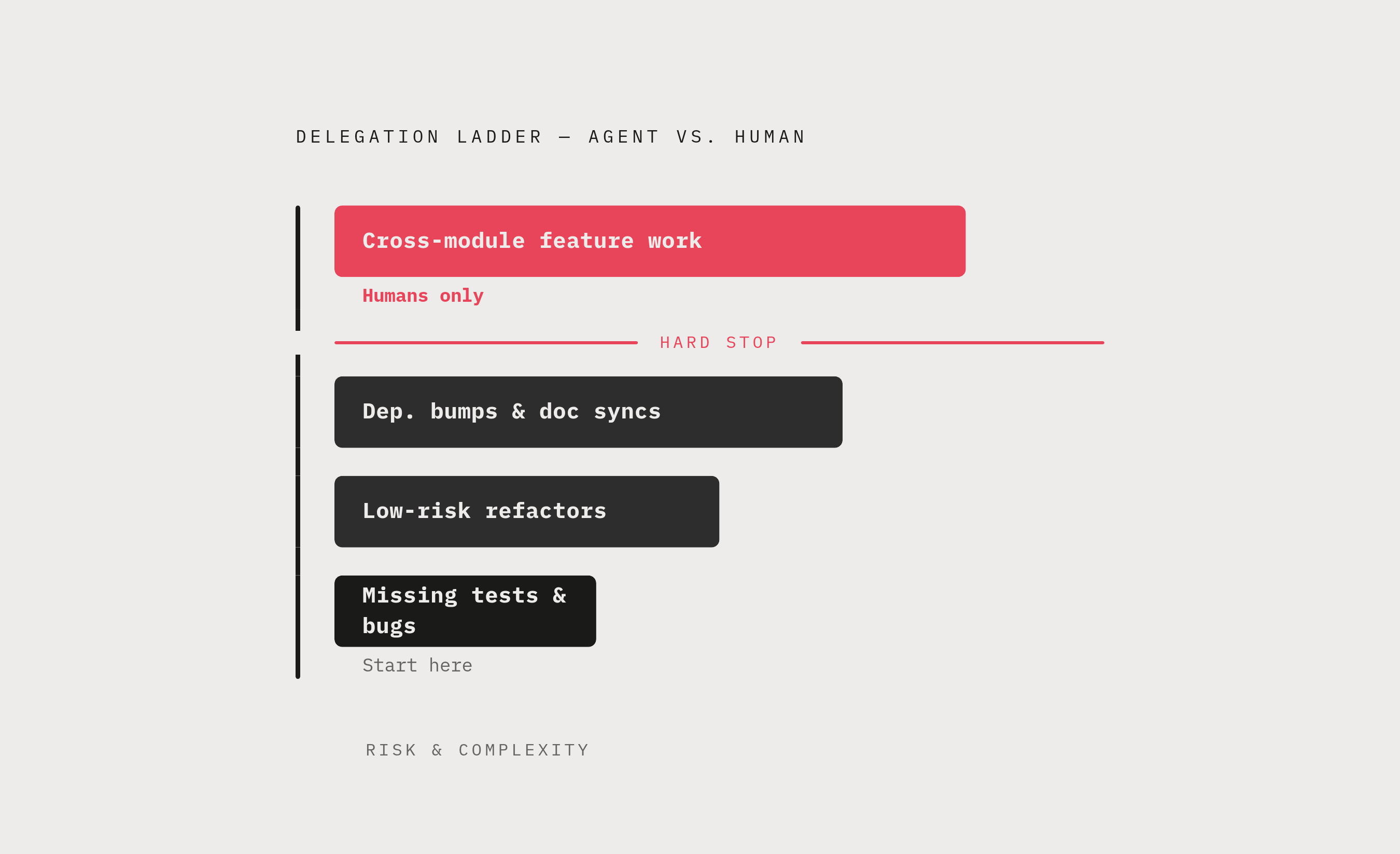
Teams rolling this out are best served by a delegation ladder. Start by handing agents issues that add missing tests or fix small, clearly described bugs. Move on to low-risk refactors once those go well, then dependency bumps and documentation syncs. Leave cross-module feature work for people, at least until the team has watched several completed cycles come back clean. The broader survey literature on automated issue resolution covers a wide range of maintenance work, bug fixes, new features, performance tuning, but the evidence for agents resolving issues reliably on their own sits heavily on the maintenance side of that range, not the feature side.
Some teams worry that sorting issues this way just adds another layer of overhead to an already busy backlog. That concern is fair, but it's cheap to resolve: a simple Linear label, something as plain as tagging a ticket "agent-eligible," takes a few seconds to apply and saves far more time than it costs by keeping agents off tasks that needed a person's judgment from the start.
Why agents fail on poorly specified issues
When an agent fails on a well-chosen issue, the cause is rarely a reasoning mistake inside the model. More often, the agent is simply working from the issue text alone, with none of the cross-module dependencies, the unwritten API contracts, or the data flow a developer would have in their head before touching that code. The fix lands in the wrong place, or it touches the right file but misses a constraint nobody wrote down anywhere the agent could see it.
Research on repository knowledge acquisition, built around a framework called ACQUIRE, traces this failure to timing. Agents that go exploring a codebase only after reading the issue, and only in the direction the issue's own keywords point them toward, tend to end up with a partial, slightly skewed picture of the code, and that early misunderstanding just compounds as the agent keeps working. ACQUIRE's fix is to separate the two steps: have the agent run a round of explicit questions and answers against the codebase before writing a single line of patch, rather than folding exploration and fixing into the same pass. That separation measurably raises how often issues get resolved correctly, and it does something else too: issues attempted without that grounding burn through far more tokens and far more steps than the ones that succeed. An under-specified issue doesn't just fail more often. It costs more every time it does.
The lesson for a Linear integration is straightforward. Whatever the agent receives, whether it's written directly into the issue or retrievable on demand, needs to carry the same context an experienced developer would gather before touching the code. In practice, that means the issue should point to the relevant files, name the module boundary the fix lives inside, name the test that should pass once it's fixed, and include the actual error output or stack trace. None of this needs to be reinvented issue by issue. A team can build a Linear issue template that does this work automatically, turning the template itself into the agent's intake form.
Context a Coding Agent Needs to Resolve a Linear Issue
A Linear issue ready to hand to an agent should include four things: the observable failure (the error message, the stack trace, or the name of the failing test), a pointer to the work site (the file path and function name where the fix belongs), the acceptance condition (the test that must pass, or a plain description of correct behavior), and a scope constraint spelling out what the agent should leave alone, whether that's an adjacent module, a public API, or the database schema.
That list is short on purpose. Studies of what coding agents actually need when editing code, run against a benchmark suite of real-world coding issues, found that agents need far less supporting material than most teams assume, as long as what they do get is the right kind of material. The signal that matters lives in the actual source code of the function being edited, not in a natural-language summary of what that function does. Summaries, even ones written by a frontier model, answered almost none of the behavioral questions the raw source code answered on its own. The same research tested whether surrounding files helped when compressed down to skeletons and signatures instead of full text, and found that issue resolution rates stayed the same whether those files were included or left out of context. Compressed context, at a fraction of the token cost, matched full-file context in how often the issue actually got fixed.
That's good news for anyone writing Linear issue templates: a short list of file and function pointers does more work than a paragraph of prose explaining what the code is supposed to do. Writing issues this way carries a second benefit that has nothing to do with agents. A ticket that names the observable failure, the work site, the acceptance condition, and the scope boundary is also just a better ticket for a human to pick up, review, or audit later. The same fields that make an issue ready for an agent make it a clearer record for the team.
How the agent executes the issue
A well-written issue still goes nowhere if the agent is running somewhere that can't install the project's dependencies, run its test suite, or hold onto state across the several steps a real fix usually takes. Resolving an issue is a sequence: find the work site, read the surrounding code, make an edit, run the tests, read what failed, adjust, and try again. None of that works in an environment that resets between steps.
A container that wipes itself clean after every tool call breaks that sequence immediately, because the agent loses the installed packages, the running process, and the filesystem changes it just made. What the task actually calls for is a stateful sandbox, something that holds onto all of that between steps the way a developer's own machine would. The survey research on agentic issue resolution frames the whole task around iterative exploration and decisions that respond to feedback, and both of those depend on the agent being able to see the results of what it did a step ago within that same session.
The sandbox also has to hold up as a matter of security. An agent capable of installing packages and running services needs to do that inside an isolated environment that keeps those actions from touching the team's shared infrastructure or leaking credentials from one run into the next.
Choosing which coding agent harness to run on your Linear issues
The harness wrapped around a model changes how well that model resolves a given kind of issue, often by a wide margin. The same underlying model, run through different scaffolding, produces genuinely different behavior, and the gap in outcomes between two harnesses tackling the identical task can be substantial.
Trajectory analysis from a tool called TRACEPROBE, built on thousands of runs across five production settings on a widely used coding-agent benchmark, makes this concrete. On one issue, Claude Code reached a targeted fix in roughly ten steps with no failed actions along the way. OpenCode, working the same issue, took a great many more steps, with repeated stretches of failing and then recovering before landing on a fix. Both may well end up passing the same tests, but the path each took to get there carries real consequences for how much a reviewer has to check and how many tokens the run burned along the way.
A few harness traits matter in particular for Linear integration. One is whether the agent runs as a background task that hands back a finished pull request, or as an interactive session that expects a person at the keyboard throughout. Another is how the harness compresses context once a repository is large or a trajectory runs long. A third is whether it supports bringing your own model, so a team can swap in a better underlying LLM as one becomes available rather than being stuck with whatever the harness shipped with. Claude Code is built around Anthropic's Claude models. Codex runs on OpenAI's GPT-6 family. Opencode works across more than 75 providers. Each of these pairings carries its own tradeoffs in how much work can run in parallel, how rate limits apply, and how the context window gets managed as a task grows. The trajectory research behind TRACEPROBE evaluated Claude Code and OpenCode together with recent models in the same benchmarks, and what it found is that the harness and the model paired with it, together, decide the outcome, not one in isolation. That argues against locking a team into a single harness. The more useful posture is to treat harness choice as a routing decision made per issue, sending different kinds of work to whichever combination handles that kind of work best.
Trajectory quality and agent trust by issue type
Whether the final patch passes its tests is too blunt a measure for a team deciding which issues to keep routing to an agent. Two runs can land on the identical pass or fail outcome by very different routes, and those routes differ in how much they cost, how much review they demand afterward, and how much risk they carry of a failure mode that just happened not to show up this time.
TRACEPROBE's trajectory analysis names specific patterns to watch for inside a run: search loops where the agent circles the same territory without making progress, and skipped verification where the agent submits a patch without actually confirming it works. Both patterns predict trouble and flag runs that deserve a closer look from a human reviewer, even when the run technically resolved the issue.
For a Linear integration, this argues for watching how an agent gets to a result, not only whether it got there. A run full of search loops or repeated failure-and-recovery cycles usually costs more in tokens and time, and it's often a sign that the issue itself was under-specified, or that the harness running it wasn't a good match for the task. A run that skips verification before handing back a patch carries review risk no matter how clean the resulting pull request looks or how well it passes CI. Kept over time, a record of trajectories gives engineering leads something concrete to point to when deciding which issue types to keep sending to a given harness and which to route elsewhere.
This kind of trajectory analysis, built on 2,500 trajectories drawn from five production settings on a coding-agent benchmark, also found that looking only at which file an agent touched doesn't separate successful runs from failed ones; the file level is too coarse. What does separate them is behavior at the function level, which function the agent picked and whether it actually finished working with it. That points trajectory review toward a specific question: not just whether the agent opened the right file, but whether it found and worked inside the right function quickly.
Wiring the Linear-to-PR pipeline
This only works if it fits inside how a team already operates, rather than asking them to adopt a new way of working. The integration should sit inside how the team already operates: issues get filed in Linear, discussed in Slack, and reviewed as code in GitHub or GitLab. The agent's job is to take part in that existing flow, not to give the team a reason to start using something new.
There are a few reasonable ways to kick off a run, and each comes with a different tradeoff. A label-based trigger, applying something like an "agent-eligible" tag in Linear, is the lowest-friction option and slots easily onto a workflow a team already runs. A Slack command trigger lets an engineer type a command in the project channel linking to the Linear issue, which suits one-off delegation and leaves the request sitting in the channel as a record anyone can scroll back to. A webhook-based trigger fires automatically whenever a matching issue reaches a given status, say "Ready for Dev," and offers full automation, but it asks the team to settle in advance exactly which issues should qualify for that status to mean "send this to an agent."
Whichever trigger fires, the integration layer needs to pull the issue's title, its description, any linked files or pull requests, and whatever structured fields exist (an error message, an affected module) and hand all of it to the agent as its starting context. This is where the issue template discussed earlier does its real work, turning what would otherwise be a scramble to gather context into something the integration can extract automatically the moment a run starts.
The output belongs back where the team already looks for it. The agent's finished work should arrive as a pull request in GitHub or GitLab, with the originating Linear issue linked in the PR description and that issue's status updated automatically once the PR lands. From the reviewer's side, nothing about the review itself should look unfamiliar. It's a pull request like any other, not a new interface to learn or a new tool competing for attention.